
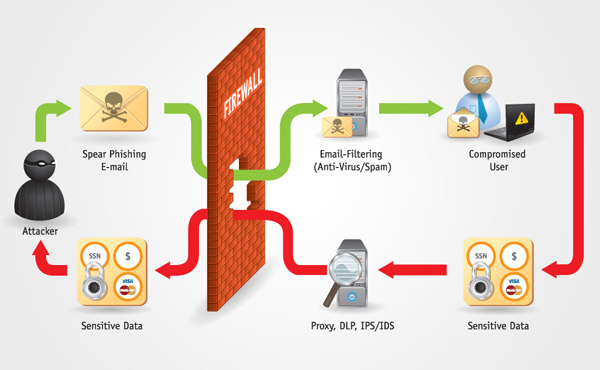
Phishing is a type of online scam where criminals send an email that appears to be from a legitimate company asking you to provide sensitive information. This is usually done by including a link that supposedly takes you to the company’s website where you are asked to fill in your information – but the website is a clever fake and the information you provide goes straight to the crooks behind the scam.
Some clues indicating for Scam Email :
- The email is not addressed to the recipient.
- The message contains poor spelling and grammar: The words ( eg: Online Banking ) are capitalized throughout the text.
- They try to reassure recipients by encouraging them to confirm the email is from legit company / business by using a link they provide.
- The message contains a mismatched URL
- URLs contain a misleading domain name
- The message asks for personal information
- The offer seems too good to be true
- You’re asked to send money to cover expenses
- The message makes unrealistic threats
- The message appears to be from a government agency

How to Protect ?
- Never click on links, download files or open attachments in emails (or on social media), even if it appears to be from a known, trusted source. If you have any doubt, you should open a new browser window and type the URL into the address bar.
- You should pay particularly close attention to shortened links, especially on social media. Cybercriminals often use these to trick you into thinking you are clicking a legitimate link, when in fact you’re being inadvertently directed to a fake site.
- Does that email look suspicious? Read it again.
- Be wary of threats and urgent deadlines.
- Browse securely with HTTPs